Mastering Core Web Vitals Optimization for 2026: Your Blueprint to Higher Google Rankings
In the ever-evolving landscape of search engine optimization, staying ahead of Google’s algorithmic updates is not just an advantage; it’s a necessity. As we look towards 2026, one factor continues to solidify its position as a cornerstone of SEO success: Core Web Vitals. These user-centric metrics, measuring real-world user experience, are pivotal for anyone aiming to improve their website’s performance and climb Google’s search engine results pages (SERPs). This comprehensive guide will delve deep into Core Web Vitals Optimization strategies for 2026, providing actionable insights to elevate your site’s health and secure those coveted top positions.
The digital realm is becoming increasingly competitive. Every fraction of a second in page load time, every flicker of content, and every moment of user frustration can mean the difference between a conversion and a lost visitor. Google’s emphasis on Core Web Vitals underscores a fundamental truth: user experience is paramount. A website that loads quickly, is visually stable, and offers a smooth interactive experience is not only favored by users but also by search engines. By meticulously focusing on Core Web Vitals Optimization, you’re not just chasing algorithms; you’re building a better web for your audience.
Our journey through Core Web Vitals Optimization for 2026 will cover everything from understanding the three core metrics – Largest Contentful Paint (LCP), First Input Delay (FID), and Cumulative Layout Shift (CLS) – to implementing advanced technical strategies and continuous monitoring. We’ll explore how these metrics have evolved, what new considerations might arise, and how to integrate these optimizations into a holistic SEO strategy that drives tangible results. Prepare to transform your website’s performance and achieve a significant boost in your Google rankings.
Understanding the Pillars of Core Web Vitals in 2026
Before we dive into optimization tactics, it’s crucial to have a crystal-clear understanding of what Core Web Vitals entail. These three metrics are designed to quantify different aspects of user experience, and each plays a distinct role in Google’s ranking considerations. Effective Core Web Vitals Optimization begins with a deep comprehension of these individual components.
Largest Contentful Paint (LCP): Measuring Loading Performance
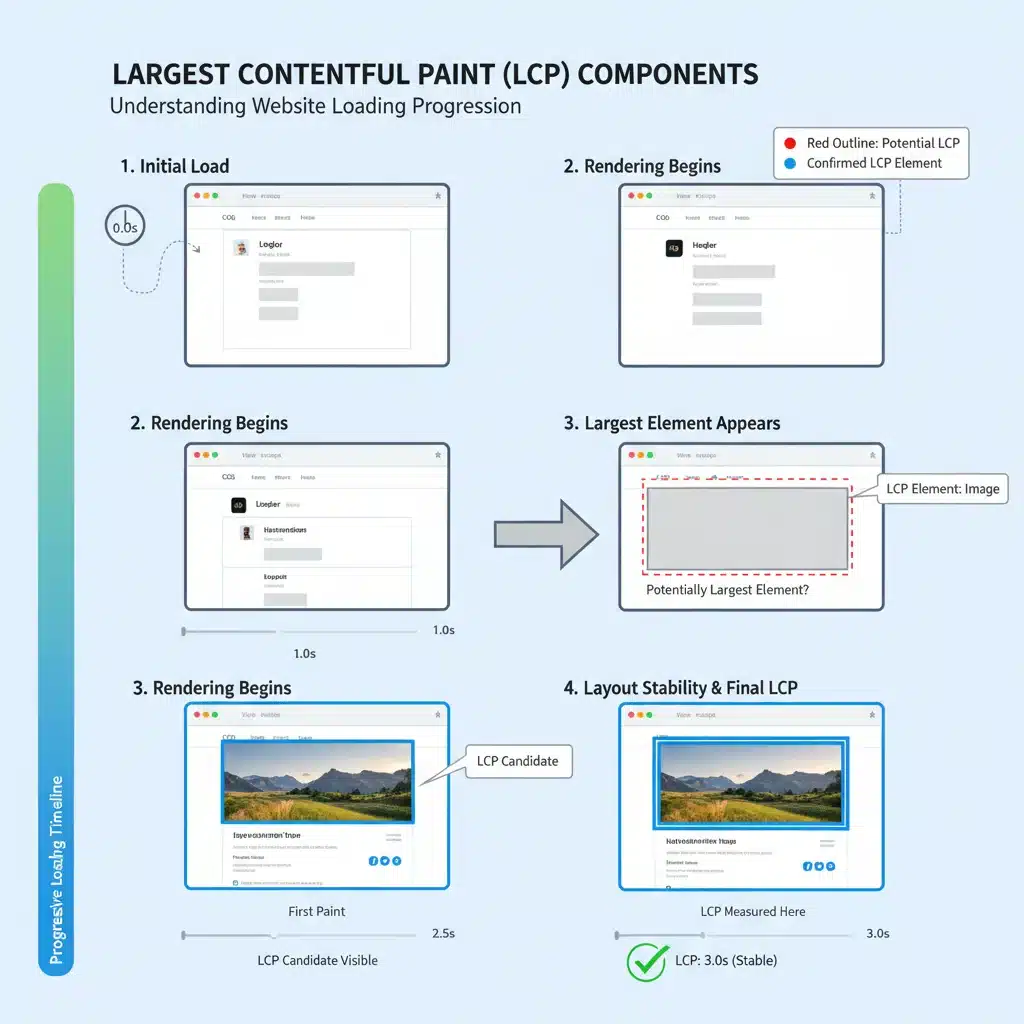
LCP measures the time it takes for the largest content element on your page to become visible within the viewport. This could be an image, a video element, or a large block of text. A fast LCP reassures users that the page is loading quickly and provides a positive first impression. For 2026, Google considers an LCP of 2.5 seconds or less to be ‘Good’. Anything above 4.0 seconds is considered ‘Poor’.
Factors influencing LCP include server response time, render-blocking resources (CSS, JavaScript), resource load times, and client-side rendering. Optimizing LCP is often the first step in any comprehensive Core Web Vitals Optimization strategy because it directly impacts perceived performance.
- Server Response Time: A slow server is a major bottleneck. Optimizing your hosting, using a CDN, and caching strategies are vital.
- Render-Blocking Resources: Unoptimized CSS and JavaScript can prevent your browser from rendering content. Minification, deferring non-critical CSS/JS, and inlining critical CSS are key.
- Resource Load Times: Large images or videos significantly increase LCP. Image optimization (compression, correct formats like WebP, responsive images) and lazy loading are essential.
- Client-Side Rendering: For JavaScript-heavy applications, ensuring critical content is rendered server-side or pre-rendered can drastically improve LCP.
Successfully tackling LCP issues requires a multi-faceted approach, often involving collaboration between developers and SEO specialists. It’s not just about speed; it’s about the speed of what matters most to the user.
First Input Delay (FID): Quantifying Interactivity
FID measures the time from when a user first interacts with a page (e.g., clicks a button, taps a link) to the time when the browser is actually able to respond to that interaction. A low FID score means your page is responsive and interactive almost immediately, preventing user frustration. Google aims for an FID of 100 milliseconds or less for a ‘Good’ experience. Anything above 300 milliseconds is ‘Poor’.
Unlike LCP and CLS, which can be measured in a lab environment, FID requires real user data (field data) because it’s dependent on actual user interaction. The primary culprit for high FID is often heavy JavaScript execution that ties up the main thread, preventing it from responding to user inputs. This is where diligent Core Web Vitals Optimization for interactivity comes into play.
- JavaScript Execution: Long-running JavaScript tasks are the biggest cause of high FID. Break up long tasks, defer non-critical JavaScript, and use web workers.
- Third-Party Scripts: Ads, analytics, and other third-party scripts can significantly impact FID. Audit and optimize these scripts, load them asynchronously or defer them.
- Code Splitting: Deliver only the JavaScript needed for the current view, loading other parts on demand.
- Main Thread Work: Minimize main thread work by optimizing CSS, reducing complex layouts, and avoiding excessive DOM manipulation.
Improving FID is about making your website feel snappy and reactive. It directly impacts a user’s ability to engage with your content, which is a critical aspect of a positive user experience.
Cumulative Layout Shift (CLS): Ensuring Visual Stability
CLS measures the sum of all individual layout shift scores for every unexpected layout shift that occurs during the entire lifespan of the page. An unexpected layout shift happens when a visible element changes its position from one rendered frame to the next, causing content to jump around. This is incredibly frustrating for users and can lead to misclicks. A ‘Good’ CLS score is 0.1 or less. Above 0.25 is considered ‘Poor’.
Common causes of CLS include images or videos without dimension attributes, dynamically injected content (like ads, embeds), web fonts causing FOIT/FOUT, and actions awaiting a network response before updating the DOM. Addressing these issues is a cornerstone of Core Web Vitals Optimization for visual stability.
- Image and Video Dimensions: Always include
widthandheightattributes on your images and video elements, or reserve the necessary space with CSS aspect ratio boxes. - Ad Slots and Embeds: Reserve space for ad slots and embeds before they load. Avoid placing dynamically injected content above existing content.
- Web Fonts: Use
font-display: swap, preloading critical fonts, and ensuring fallback fonts are similar in size to prevent layout shifts. - Dynamic Content: If content must be injected, do so without causing existing content to shift. Use transformations or position absolute/fixed.
CLS is often overlooked but can severely impact user trust and engagement. No one enjoys trying to click a button only for it to jump out from under their cursor. Prioritizing CLS is a crucial part of providing a polished and professional user experience.
Advanced Strategies for Core Web Vitals Optimization in 2026
Beyond the foundational understanding, achieving excellent Core Web Vitals scores in 2026 demands a more sophisticated approach. Here, we delve into advanced strategies that will give you a significant edge in your Core Web Vitals Optimization efforts.
Prioritizing Critical Resources and Code Splitting
Modern web applications often load a large amount of JavaScript and CSS. A key strategy for LCP and FID is to identify and prioritize critical resources. Critical CSS (CSS needed for the content above the fold) should be inlined, while the rest can be loaded asynchronously. Similarly, critical JavaScript should be executed first, and non-critical scripts deferred or loaded with async or defer attributes.
Code Splitting is another powerful technique, especially for large JavaScript bundles. Instead of loading your entire application’s JavaScript at once, you split it into smaller chunks that are loaded on demand. This significantly reduces the initial payload and the amount of JavaScript the browser needs to parse and execute, directly impacting LCP and FID.
- Use webpack or similar bundlers for efficient code splitting.
- Identify critical rendering path elements and optimize their delivery.
- Leverage
<link rel="preload">for essential resources and<link rel="preconnect">for third-party origins.
Leveraging Server-Side Rendering (SSR) and Static Site Generation (SSG)
For complex, JavaScript-heavy sites (like those built with React, Vue, or Angular), client-side rendering can lead to poor LCP and FID scores. Users see a blank page while JavaScript loads and executes. Server-Side Rendering (SSR) pre-renders the initial HTML on the server, sending a fully formed page to the browser. This dramatically improves LCP as content is immediately visible.
Static Site Generation (SSG) takes this a step further by generating all HTML files at build time. These static files are then served directly from a CDN, offering unparalleled speed and security. For content that doesn’t change frequently, SSG is the ultimate solution for Core Web Vitals Optimization, virtually guaranteeing excellent LCP and FID.
- Consider Next.js, Nuxt.js, or Gatsby for implementing SSR/SSG.
- Understand the trade-offs: SSR adds server load, SSG requires rebuilds for updates.
- Combine with client-side hydration for interactive elements.
Optimizing Third-Party Scripts and Iframes
Third-party scripts (analytics, ads, social media widgets, tracking pixels) are notorious for negatively impacting Core Web Vitals, especially FID and CLS. While often essential, they must be managed carefully.
- Audit Regularly: Identify all third-party scripts and evaluate their necessity and impact.
- Load Asynchronously/Defer: Use
asyncordeferattributes for scripts that don’t need to block initial rendering. - Lazy Load: Load scripts only when they are needed, such as when a user scrolls to a specific section.
- Host Locally (where possible): For some resources, hosting them locally can reduce DNS lookups and connection overhead.
- Reserve Space for Iframes/Ads: Prevent CLS by explicitly setting dimensions for iframes and ad slots.
Diligent management of third-party resources is a critical, often overlooked, aspect of effective Core Web Vitals Optimization.

The Role of Content Delivery Networks (CDNs) and Caching
CDNs are indispensable for global audiences. By serving content from a server geographically closer to the user, CDNs drastically reduce latency, directly improving LCP. They also offload traffic from your origin server, enhancing overall site stability and speed.
Caching strategies (browser caching, server caching, CDN caching) are equally vital. By storing frequently accessed resources, caching reduces the need to fetch them repeatedly, leading to faster load times on subsequent visits and for returning users. This is a fundamental layer of any robust Core Web Vitals Optimization plan.
- Choose a CDN provider with a wide global network.
- Configure appropriate cache-control headers for static assets.
- Implement server-side caching for dynamic content where applicable.
Monitoring and Measuring Core Web Vitals: Tools and Techniques
Core Web Vitals Optimization is not a one-time task; it’s an ongoing process. Continuous monitoring and measurement are crucial to ensure your optimizations are effective and to catch any regressions quickly. Google provides excellent tools for this purpose:
Google Search Console (GSC)
GSC’s Core Web Vitals report provides a high-level overview of your site’s performance based on real-world user data (CrUX – Chrome User Experience Report). It categorizes your pages as ‘Good’, ‘Needs Improvement’, or ‘Poor’ for each metric, helping you identify problematic URLs and track progress over time. This is your primary source of truth for how Google perceives your site’s Core Web Vitals.
PageSpeed Insights (PSI)
PSI provides both field data (from CrUX) and lab data (simulated load in a controlled environment using Lighthouse). Lab data is excellent for debugging and identifying specific issues because it’s reproducible. It offers detailed recommendations for improving LCP, FID (though FID is primarily field-based, TBT – Total Blocking Time – is a good lab proxy), and CLS.
Lighthouse
Integrated into Chrome DevTools, Lighthouse allows you to run performance audits on any page. It provides a comprehensive report covering performance, accessibility, SEO, and best practices, with actionable advice to improve your Core Web Vitals. It’s invaluable for developers during the optimization process.
Chrome DevTools
The Performance panel in Chrome DevTools is a powerful tool for deep-diving into performance issues. You can record page loads, analyze network requests, CPU activity, and identify long-running JavaScript tasks that impact FID and LCP.
Web Vitals JavaScript Library
For advanced monitoring, Google’s web-vitals JavaScript library allows you to measure Core Web Vitals directly on your site for real users and send that data to your analytics platform (e.g., Google Analytics, custom backend). This provides highly granular, real-time insights into your actual user experience.
By regularly utilizing these tools, you can maintain a proactive stance on Core Web Vitals Optimization, ensuring your site consistently delivers an excellent user experience.
The Future of Core Web Vitals and SEO in 2026
As we march towards 2026, it’s reasonable to expect that Core Web Vitals will continue to evolve. Google has historically refined its metrics and introduced new ones as web technologies advance and user expectations shift. While the core principles of speed, interactivity, and visual stability will remain constant, the specific measurements or additional metrics might be introduced.
One potential area of development could be a greater emphasis on AI’s role in user experience, leading to more nuanced metrics that capture aspects like content relevance or cognitive load. However, the foundational work of Core Web Vitals Optimization will always serve as a strong base.
The key takeaway for 2026 and beyond is adaptability. Websites that are built with performance and user experience at their core will be best positioned to adapt to future changes. This means fostering a culture of performance within your development and marketing teams, rather than treating Core Web Vitals as a checklist to be completed once.
Furthermore, the synergy between Core Web Vitals and other SEO factors will only grow stronger. A fast, stable, and interactive website naturally leads to lower bounce rates, higher engagement, and longer session durations – all positive signals for Google. Therefore, investing in Core Web Vitals Optimization is not just about meeting a technical requirement; it’s about investing in your overall SEO health and long-term digital success.
Practical Steps to Kickstart Your Core Web Vitals Optimization
Ready to get started? Here’s a checklist of practical steps to begin or enhance your Core Web Vitals Optimization journey:
- Audit Your Current Performance: Use PageSpeed Insights and Google Search Console to get a baseline understanding of your site’s Core Web Vitals scores. Identify your weakest links.
- Address LCP Issues First: Focus on server response time, critical CSS/JS, and image optimization. These often yield the biggest initial improvements.
- Optimize JavaScript for FID: Analyze your JavaScript execution, break up long tasks, and defer non-critical scripts.
- Eliminate CLS: Ensure all images/videos have dimensions, reserve space for dynamic content, and optimize font loading.
- Implement a CDN and Caching Strategy: Leverage these technologies for faster content delivery and reduced load times.
- Regularly Monitor: Set up continuous monitoring using tools like the Web Vitals library and regularly check GSC reports.
- Test on Real Devices: Performance can vary significantly across devices and network conditions. Test on various mobile devices and slower networks.
- Educate Your Team: Ensure developers, designers, and content creators understand the importance of Core Web Vitals in their respective roles.
- Prioritize Mobile Experience: With Google’s mobile-first indexing, optimizing for mobile Core Web Vitals is paramount.
- Stay Updated: Keep an eye on official Google announcements and web.dev for any updates or new best practices related to Core Web Vitals.
Conclusion: Core Web Vitals as a Strategic Imperative
In conclusion, Core Web Vitals Optimization is not merely a technical exercise; it’s a strategic imperative for any business or individual aiming for sustained success in the digital arena. As Google continues to refine its algorithms to prioritize user experience, a strong foundation in Core Web Vitals will be non-negotiable for achieving and maintaining high search rankings in 2026 and beyond.
By understanding LCP, FID, and CLS, implementing advanced optimization techniques, and committing to continuous monitoring, you can significantly improve your website’s performance, enhance user satisfaction, and ultimately drive better SEO outcomes. The investment in Core Web Vitals Optimization pays dividends not just in search visibility, but in conversions, brand reputation, and overall business growth. Start your optimization journey today and position your website for unparalleled success in the years to come.